GEOVISION 020-20820-006 Dvi Dual Link Audio Cable Dvr 16CH GV-1480/GV-1240
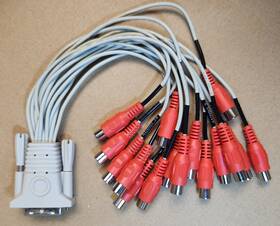
( Brand: Geovision ), ( Manufacturer Part Number: 020-20820-006 ), ( Non-domestic Product: No ), ( Type: Dvi ), ( Connectivity: Dvi-i ), ( Country Of Origin: Taiwan )
Review GEOVISION Original 16ch Dvi i Dual Link Audio Cable Gv-1480/gv-1240 Dvr
The **Geovision 020-20820-006 16-Channel DVI-I Dual-Link Audio Cable** is a high-performance, professional-grade cable designed exclusively for seamless integration with Geovision s **GV-1480** and **GV-1240** series digital video recorders (DVRs). Engineered to meet the demanding requirements of surveillance systems, this cable delivers both **uncompromising video clarity** and **crystal-clear audio transmission** across all 16 channels, ensuring a robust and reliable connection between your DVR and external displays or monitoring setups. Constructed with **high-quality, dual-link DVI-I (Digital Visual Interface) technology**, it supports **ultra-high-resolution video signals** up to **1920x1200 60Hz**, making it ideal for applications where pixel-perfect detail is critical, such as high-security environments, corporate facilities, or large-scale surveillance networks. The **dual-link configuration** enhances bandwidth capacity, reducing signal degradation and ensuring smooth playback of high-definition footage without compression artifacts.
Beyond its exceptional video performance, this cable is equipped with **dedicated audio channels**, allowing for synchronized transmission of both video and audio signals an essential feature for systems requiring voice verification, intercom functionality, or alarm integration. The **16-channel design** enables simultaneous connectivity to multiple monitors, cameras, or audio devices, making it a versatile solution for multi-screen surveillance setups without the need for additional adapters or splitters. Built to withstand the rigors of professional use, the cable features **durable, shielded conductors** that protect against electromagnetic interference (EMI) and radio frequency interference (RFI), ensuring stable signal integrity even in electrically noisy environments. Its **low-latency design** minimizes delay between video and audio, which is particularly important for real-time monitoring and response scenarios.
The **DVI-I interface** on this cable supports both **digital and analog video signals**, providing flexibility for compatibility with a wide range of displays, including LCD monitors, projectors, and even older analog devices through appropriate adapters. Additionally, the **audio portion of the cable** adheres to standard **3.5mm TRS (Tip-Ring-Sleeve) connectors**, ensuring seamless integration with microphones, speakers, or audio interfaces. The **high-density, modular construction** of the cable allows for easy routing and installation in tight spaces, while its **reinforced connectors** prevent accidental disconnections, reducing downtime and maintenance efforts. Whether deployed in a **small office, industrial facility, or large-scale public security system**, this cable serves as a dependable backbone for high-fidelity surveillance, delivering both **visual precision** and **audio fidelity** with professional-grade reliability.
**Pros and Cons of buying a Geovision 020-20820-006 16-Channel DVI-I Dual-Link Audio Cable for GV-1480/GV-1240 DVRs**
### **Pros**
1. **Compatibility** This cable is specifically designed for Geovision s GV-1480 and GV-1240 series DVRs, ensuring seamless integration without compatibility issues. It supports dual-link DVI, which is necessary for high-resolution video outputs (up to 1920x1200) from these DVRs.
2. **Audio Support** Unlike standard DVI cables, this one includes audio transmission capabilities, allowing for synchronized audio-visual output. This is useful if you need to connect the DVR s audio to a monitor or display that supports DVI with embedded audio (though most monitors do not; see cons below).
3. **High-Quality Video Transmission** Dual-link DVI provides a higher bandwidth than single-link, reducing signal degradation over longer distances (up to 15 feet without additional adapters). This ensures crisp, high-definition video output from the DVR.
4. **Reliability** As an official Geovision accessory, the cable is likely to be well-tested for compatibility and durability, reducing the risk of malfunctions or signal loss.
5. **Future-Proofing** If you plan to upgrade your display to a newer model that supports DVI (though rare today), this cable will still work, provided the display meets the DVI-I standard.
---
### **Cons**
1. **Limited Audio Compatibility** Most modern monitors and displays do not support audio over DVI, even with embedded audio. This cable may only work with specialized displays or converters that accept DVI with embedded audio (e.g., some older CRT monitors or specific HDMI-to-DVI converters with audio passthrough). If you need audio, HDMI or optical audio is a more practical solution.
2. **Obsolete Connection Type** DVI is becoming increasingly rare, as HDMI has largely replaced it for consumer and professional applications. You may need additional adapters (e.g., DVI to HDMI) to connect to newer displays, which could introduce potential signal quality issues or compatibility problems.
3. **Length Limitations** While dual-link DVI can handle up to 15 feet without signal degradation, longer distances may require repeaters or active cables. This could add cost and complexity to your setup.
4. **Single-Purpose Use** This cable is exclusively for the GV-1480/GV-1240 series. If you own a different Geovision model or another brand s DVR, it won t be compatible, limiting its versatility.
5. **Potential for Redundancy** If your DVR already supports HDMI output (which many modern models do), using DVI may feel outdated. HDMI is more common for displays and offers better audio support (via HDMI audio).
6. **Cost vs. Benefit** For the price of this cable, you might be able to purchase an HDMI cable and a separate audio solution (e.g., optical or RCA), which could be more practical for most users.
---
### **Conclusion**
The Geovision 020-20820-006 16-channel DVI-I dual-link audio cable is a **niche but useful accessory** for users specifically needing to connect a GV-1480 or GV-1240 DVR to a DVI-compatible display with embedded audio support. Its strengths lie in its **dedicated compatibility, high-resolution video capability, and reliability** for its intended use case. However, its **limited audio compatibility, outdated connection type, and potential redundancy** (especially if HDMI is an option) make it less ideal for most modern setups.
If your primary goal is **video output**, an HDMI cable would likely be a more future-proof and widely compatible choice. If you **absolutely need DVI** (e.g., for legacy equipment or specific display requirements) and can confirm your monitor supports embedded audio over DVI, then this cable is a solid, official solution. Otherwise, consider pairing the DVR with an HDMI cable and a separate audio output (e.g., optical or RCA) for better versatility.
### **Recommendation**
- **Buy the cable if:**- You are certain your display supports embedded audio over DVI-I.
- You are working with the GV-1480/GV-1240 series and need a reliable, high-bandwidth connection.
- You cannot or do not want to use HDMI for some reason (e.g., existing DVI infrastructure).
- **Avoid the cable if:**- Your display does not support audio over DVI (most do not).
- You plan to use HDMI or another modern connection type in the future.
- You are open to more flexible solutions like HDMI separate audio.
For most users, **prioritizing HDMI output and a separate audio solution** would be the more practical and future-proof approach. However, if you are locked into DVI for your setup, this cable is a well-made, official option.
Details:
The first few I have are new in the original sealed bag all unused.
part #: 02020820006 prices
- $145.00-$263.99
specifications surveillancegadgetgo:
- brand: Geovision
- mpn: 020-20820-006
- non-domestic product: No
- type: Dvi
- connectivity: Dvi-i
- country of origin: Taiwan
shipping surveillancegadgetgo:
- type: Calculated
- transit: 3-10 Days
- cost: $15.60
- class: Expedited
- service: USPS Priority Mail
- carrier: USPS
returns surveillancegadgetgo:
- policy: No Returns
seller surveillancegadgetgo:
- rating: 100.0%
- # reviews: 40
- city: Manchester, Connecticut
offer surveillancegadgetgo:
- quantity: 4
- best offers: True
- sold: 0
- started: May 18, 2026
- availability: In Stock
- options: Ship-to-home
general surveillancegadgetgo:
- condition: New
- Home Surveillance > Home Surveillance Parts Accessories > Other Surveillance Parts Accessories
payments surveillancegadgetgo:
- wallet: Google-pay
- credit card: Visa
- other
Geovision 020-20820-006 Is Similar To:
- Geovision Inc Gv-mount211-4 New Vision Mounting Bracket For Ip Camera (38% similar) Miscellaneous application/usage: wall. Useful products. You are purchasing a product designed for use in north America. Mpn: GV-MOUNT211-4. Physical characteristics weight approximate: 1.16 lb. Contact information address: arsenal PC, 36245 Euclid ave, willowy, oh 44094. All domestic shipping is via...(April 16th, 2025)